 Posted by
 It’s time for something new, something else. I’ve been thinking about writing about something different than the usual VMware stuff. I have something cool to share.
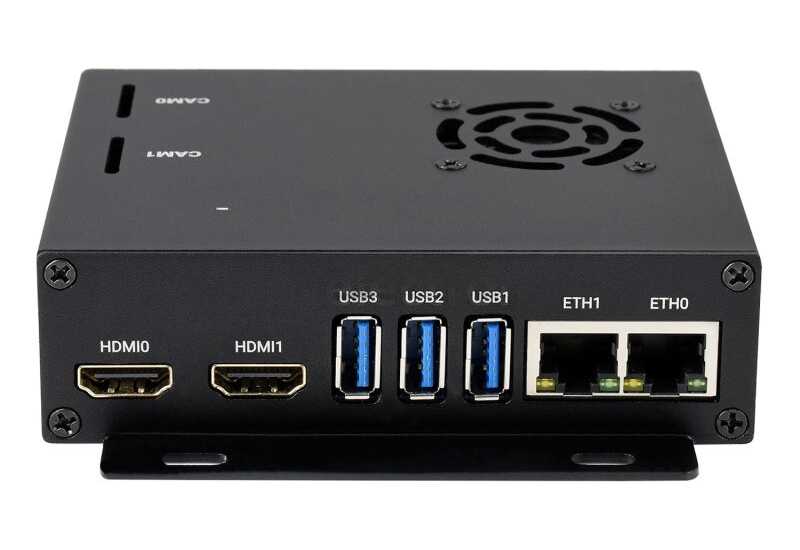
I have a “slow” internet connection, about 50Mbit down and 20Mbit up. So if someone wants to steal TBs of my personal data, good luck! You’re in for a long, very long ride. But that slow connection is about to be replaced with fiber. A whopping 1Gbit down and up. The downside is that someone could steal my data without me even noticing it. And that got me thinking: I want something to monitor my internet traffic. Something inline to capture everything. In this blog, I’ll share what I have found. Two simple components that should do the job. They are: Waveshare CM4-DUAL-ETH-BOX-A and Raspberry Pi Compute Module 4 (CM4004032)

Component Breakdown
1. Waveshare CM4-DUAL-ETH-BOX-A This carrier board is designed specifically for the Raspberry Pi Compute Module 4 (CM4), transforming it into a compact, dual-NIC (Network Interface Card) device.
Key Features:
- Dual Gigabit Ethernet Ports:
- ETH0: Directly connected to the CM4’s native Ethernet controller.
- ETH1: Directly connected to the CM4’s native Ethernet controller.
- Enables inline network monitoring (modem → ETH0 → CM4 → ETH1 → router).
- Industrial-Grade Design:
- Wide Voltage Input (7–36V DC): Supports stable operation even with fluctuating power sources.
- Active Cooling: Includes a PWM-controlled fan (5V/12V selectable) and aluminum alloy case for heat dissipation.
- Expandability:
- 3× USB 3.2 Gen1 Ports: For additional storage or peripherals.
- Dual HDMI, MIPI CSI/DSI: Optional for dashboards or security camera integration.
- RTC (Real-Time Clock): Maintains time accuracy during power outages using a CR1220 battery.
Technical Specifications:
| Parameter | Details |
|---|---|
| Dimensions | 109.0 × 91.5mm |
| Power Requirements | ≥18W recommended for stable use |
| Ethernet | 2× RJ45 (10/100/1000M) |
| GPIO | 40-pin Raspberry Pi header |
| Storage Options | MicroSD slot (for Lite CM4) |
2. Raspberry Pi Compute Module 4 (CM4004032) The CM4 is the brains of the operation, offering embedded-grade performance in a compact form factor.
Key Features:
- 32GB eMMC Storage: Faster and more reliable than SD cards, ideal for logging network data.
- 4GB LPDDR4 RAM: Handles resource-intensive tasks like traffic analysis and IDS/IPS (e.g., Suricata).
- Broadcom BCM2711 SoC: Quad-core Cortex-A72 CPU (1.5GHz) for real-time processing.
- PCIe Support: Future-proofing for high-speed expansions (e.g., NVMe storage).
Why CM4 Over Raspberry Pi 5?
- Industrial Reliability: Operating temperature range of -25°C to 80°C
- Long-Term Availability: Guaranteed production until 2031
- Custom Carrier Boards: Waveshare’s design optimizes the CM4 for networking use cases

Hardware Setup Overview
Physical Assembly
- Insert the CM4: Secure the CM4004032 into the CM4-DUAL-ETH-BOX-A’s SODIMM socket.
- Connect Power: Use a 12V/2A adapter (included in the BOX-A kit).
- Network Wiring:
- ETH0: Connect to your modem.
- ETH1: Connect to your router.
- Cooling: Ensure the fan is set to 12V (default) and test airflow.
Why This Setup Works for Network Monitoring
- Dual-NIC Architecture: Acts as a transparent bridge, inspecting all traffic without disrupting network flow.
- High Throughput: Dual Gigabit ports handle modern internet speeds (up to 1Gbps).
- Expandability: USB 3.2 ports allow adding storage for logs or threat intelligence databases.
- Industrial Durability: Designed for 24/7 operation, critical for always-on monitoring.
Key Considerations
- Power Supply: Use ≥18W to avoid shutdowns during peak loads.
- Cooling: Monitor fan speed via the EMC2301 controller to prevent thermal throttling.
- Initial Configuration:
- Flash Raspberry Pi OS Lite (64-bit) to the CM4’s eMMC via the USB SLAVE port.
- Disable Bluetooth/WiFi if unused (via hardware jumpers).
Next Steps: Software Setup (Preview)
In the upcoming blog, I’ll configure:
- Security Onion: Combines Suricata (IDS/IPS), Zeek (traffic analysis), and Kibana (dashboards).
- ntopng: Monitors bandwidth per IP and triggers alerts for data spikes.
- Grafana: Visualizes network metrics for actionable insights.
Conclusion
The Waveshare CM4-DUAL-ETH-BOX-A and CM4004032 form a robust, scalable foundation for DIY network security. By leveraging industrial-grade hardware, you gain enterprise-level monitoring capabilities at a fraction of the cost. Stay tuned for Part 2, where we’ll dive into configuring open-source security tools to transform this setup into a hacking attempt-detecting powerhouse!
One comment