 Posted by
 Problem
In large VCF Operations environments managing multiple workload types:
- Manual policy creation for different environments (Production, Development, Test) is time-consuming and error-prone
- Creating custom groups with tag-based membership requires multiple manual steps through the UI
- Tag categories and tags must be created individually through the web interface
- Ensuring consistency across policies and custom groups becomes difficult as the environment scales
- New resources require manual policy assignment or complex custom group configurations
- Maintaining a standardized tag taxonomy across teams is challenging without automation
Troubleshooting
Initial attempts to manage policies and tags efficiently faced several challenges:
- Manual UI Navigation: Creating a single policy with associated custom group and tags required navigating through multiple VCF Operations UI screens
- Inconsistent Naming: Without standardization, policy and custom group names varied across implementations
- Tag Sprawl: Teams created redundant tag categories and tags without a unified taxonomy
- Time Investment: Setting up a complete environment (policies, custom groups, tags) for multiple workload types could take hours
- Documentation Gap: No easy way to document or replicate policy configurations across environments
- API Complexity: While VCF Operations provides REST APIs, manually constructing JSON payloads for policies and custom groups is tedious and error-prone
Solution
Created a PowerShell script (VCF Operations Policy Creator – VOPC) to automate the entire workflow. The complete script is available at the end of this post.
Script Functionality
The VOPC script automates the complete workflow for setting up VCF Operations monitoring infrastructure:
- Authenticates with VCF Operations using provided credentials and acquires an API session token
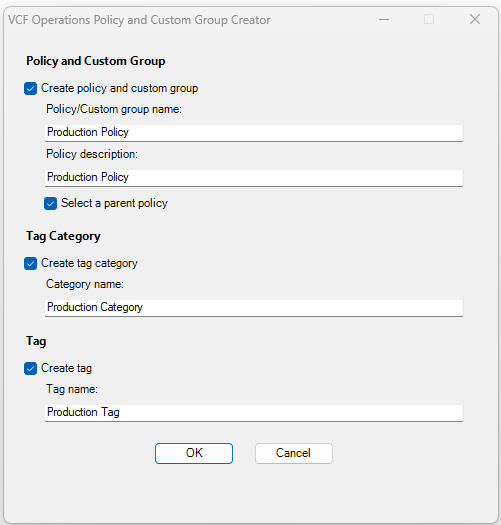
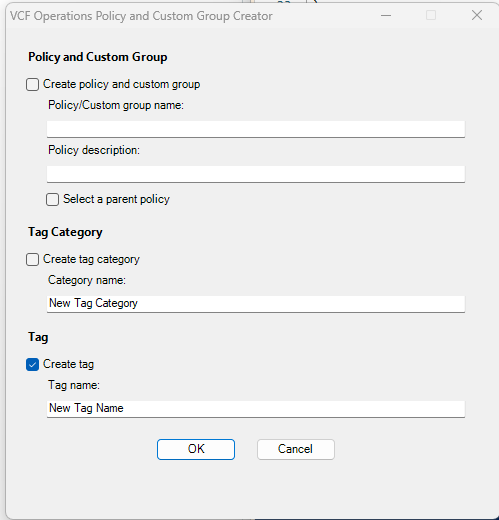
- Presents a GUI interface allowing users to configure what to create (policies, custom groups, tags, tag categories)
- Creates tag categories with standardized descriptions for organizing tags
- Creates tags within specified categories with automatic existence checking
- Creates policies with optional parent-child relationships for inheritance
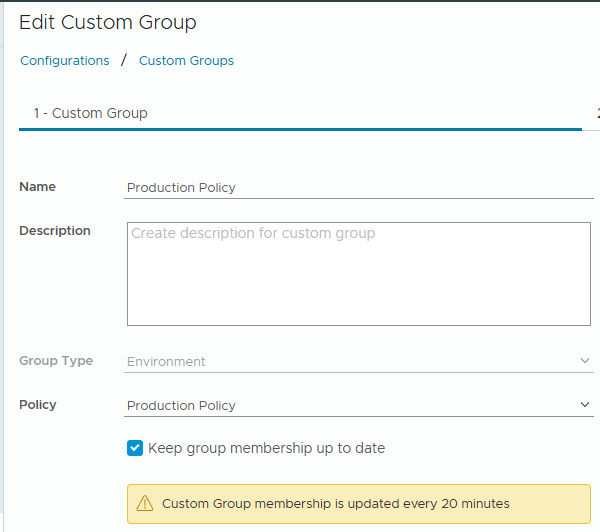
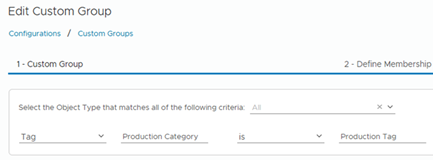
- Creates custom groups with tag-based membership rules that automatically include resources matching specified tags
- Assigns policies to custom groups establishing the monitoring framework
- Validates inputs ensuring all required fields are populated before execution
- Checks for existing objects preventing duplicates and allowing idempotent execution
- Provides detailed output showing progress and confirming successful creation of each object
- Handles errors gracefully with try-catch blocks and meaningful error messages
- Releases API token ensuring proper cleanup even if execution is cancelled
Key Features
- Tag-Based Dynamic Membership: Custom groups automatically include resources tagged with matching category/tag combinations
- Policy Inheritance: Support for parent-child policy relationships enables consistent baseline configurations
- Existence Checks: Script detects existing objects and skips creation, allowing safe re-execution
- Comprehensive GUI: User-friendly interface eliminates need to remember API syntax
- Error Handling: Robust error handling with detailed messages for troubleshooting
- Input Validation: Ensures all required dependencies are met before execution
- Idempotent Execution: Can be run multiple times without creating duplicates
Usage Example
Basic Execution:
.\VCFOpsPolicyCreator.ps1 -VCFOpsFQDN "vcfops.company.local" -VCFOpsUsername "admin" -VCFOpsPassword "VMware1!"
Example GUI Configuration for Production Environment:
☑ Create policy and custom group
    Policy/Custom group name: Production-Business-Critical
    Policy description: Business-critical production workloads
    ☑ Select a parent policy (select from grid)

☑ Create tag category
    Category name: Environment

☑ Create tag
    Tag name: Production
Sample Output
When creating new objects:
Connecting to VCF Operations: https://vcfops.company.local/suite-api/api/
Successfully connected to VCF Operations: vcfops.company.local

=== Starting VCF Operations Configuration ===

--- Processing Tag Category ---
Tag category 'Environment' created successfully

--- Creating Tag ---
Tag 'Production' created successfully

--- Creating Policy and Custom Group ---
Policy 'Production-Business-Critical' created successfully
Custom group 'Production-Business-Critical' created successfully (linked to tag 'Environment/Production')
Policy 'Production-Business-Critical' assigned to custom group 'Production-Business-Critical'

=== VCF Operations Configuration Complete ===
Session token released
When objects already exist:
=== Starting VCF Operations Configuration ===

--- Processing Tag Category ---
WARNING: Tag category 'Environment' already exists. Skipping creation.

--- Creating Tag ---
WARNING: Tag 'Production' already exists in this category. Skipping creation.

--- Creating Policy and Custom Group ---
WARNING: Policy 'Production-Business-Critical' already exists. Skipping creation.
WARNING: Custom group 'Production-Business-Critical' already exists. Skipping creation.
Policy 'Production-Business-Critical' assigned to custom group 'Production-Business-Critical'

=== VCF Operations Configuration Complete ===
Session token released
Real-World Implementation
Scenario: Setting up monitoring for a multi-environment infrastructure with Production, Development, and Test workloads.
Before VOPC Script:
- Time Required: 2-3 hours per environment
- Steps: Navigate through multiple UI screens 15+ times
- Risk: Inconsistent naming and configuration
- Scalability: Does not scale with environment growth
After VOPC Script:
- Time Required: 5-10 minutes per environment
- Steps: Execute script once per environment with GUI
- Risk: Standardized naming and configuration enforced
- Scalability: Easily replicated across multiple VCF Operations instances
Implementation Steps:
- Create tag taxonomy:
# Execute for Environment category and tags
   .\VCFOpsPolicyCreator.ps1 -VCFOpsFQDN "vcfops.local" -VCFOpsUsername "admin" -VCFOpsPassword "password"
   # GUI: Create Environment category with Production tag

   .\VCFOpsPolicyCreator.ps1 -VCFOpsFQDN "vcfops.local" -VCFOpsUsername "admin" -VCFOpsPassword "password"
   # GUI: Create Development tag in Environment category

   .\VCFOpsPolicyCreator.ps1 -VCFOpsFQDN "vcfops.local" -VCFOpsUsername "admin" -VCFOpsPassword "password"
   # GUI: Create Test tag in Environment category
- Create policies and custom groups:
# Production environment
   .\VCFOpsPolicyCreator.ps1 -VCFOpsFQDN "vcfops.local" -VCFOpsUsername "admin" -VCFOpsPassword "password"
   # GUI: Create Production-Workloads policy with Environment:Production tag

   # Development environment
   .\VCFOpsPolicyCreator.ps1 -VCFOpsFQDN "vcfops.local" -VCFOpsUsername "admin" -VCFOpsPassword "password"
   # GUI: Create Development-Workloads policy with Environment:Development tag
- Apply tags to resources (via PowerCLI):
# Tag production VMs
   Connect-VIServer -Server vcenter.local
   Get-Folder "Production-VMs" | Get-VM | New-TagAssignment -Tag (Get-Tag "Production")
- Resources automatically join custom groups and receive policies within 5-10 minutes
Benefits
- Time Savings: Reduces policy setup time from hours to minutes
- Consistency: Enforces standardized naming and configuration across environments
- Scalability: Easily replicated across multiple VCF Operations instances and environments
- Automation-Friendly: Integrates with Infrastructure-as-Code workflows
- Error Reduction: Eliminates manual UI navigation errors
- Documentation: Script serves as self-documenting infrastructure configuration
- Maintainability: Simplifies updates and modifications to existing policies
- Dynamic Assignment: Tag-based custom groups automatically include new resources
Complete Script
<#
.SYNOPSIS
Script: VCFOpsPolicyCreator (VOPC)
Version: 0.3
Date: November 20, 2025
Author: Kabir Ali - info@whatkabirwrites.nl
Description: This script creates policies, custom groups, tag categories and tags in VCF Operations

Version history:
0.1 - May 14, 2024 - Initial version
0.2 - November 20, 2025 - Restructured code, fixed execution order
0.3 - November 20, 2025 - Renamed to VCFOps, added existence checks, improved GUI and error handling

.EXAMPLE
.\VCFOpsPolicyCreator.ps1 -VCFOpsFQDN "vcfops01.local.domain" -VCFOpsUsername "Admin" -VCFOpsPassword "VMware1!"
#>

#region Parameters
Param (
    [Parameter(Mandatory = $true)][string]$VCFOpsFQDN,
    [Parameter(Mandatory = $true)][string]$VCFOpsUsername,
    [Parameter(Mandatory = $true)][string]$VCFOpsPassword
)
#endregion

#region SSL Configuration
# Bypass SSL certificate verification
Add-Type @"
    using System.Net;
    using System.Security.Cryptography.X509Certificates;
    public class TrustAllCertsPolicy : ICertificatePolicy {
        public bool CheckValidationResult(
            ServicePoint srvPoint, X509Certificate certificate,
            WebRequest request, int certificateProblem) {
            return true;
        }
    }
"@
[System.Net.ServicePointManager]::CertificatePolicy = New-Object TrustAllCertsPolicy
[Net.ServicePointManager]::SecurityProtocol = [Net.SecurityProtocolType]::Tls12
#endregion

#region Functions

# Function to create a new policy
function New-VCFOpsPolicy {
    param(
        [Parameter(Mandatory = $true)]
        [string]$Name,

        [Parameter(Mandatory = $true)]
        [string]$Description,

        [string]$ParentPolicy = $null
    )

    try {
        # Check if policy already exists
        $AllPolicyURI = "https://$VCFOpsFQDN/suite-api/api/policies"
        $AllPolicies = Invoke-RestMethod -Method GET -Uri $AllPolicyURI -Headers $script:VCFOpsSessionHeader -ContentType $script:ContentType -TimeoutSec 100
        $ExistingPolicy = $AllPolicies.policySummaries | Where-Object { $_.name -eq $Name }

        if ($ExistingPolicy) {
            Write-Warning "Policy '$Name' already exists. Skipping creation."
            return $ExistingPolicy
        }

        # Create JSON for the API call
        $PolicyData = @{
            name        = $Name
            description = $Description
        }

        # Add parent policy ID if specified
        if ($ParentPolicy) {
            $PolicyData.parentPolicy = $ParentPolicy
        }

        $PolicyJSON = $PolicyData | ConvertTo-Json

        # Constructing the URL for the API call
        $NewPolicyURI = "https://$VCFOpsFQDN/suite-api/api/policies"

        # Create policy in VCF Ops
        $Result = Invoke-RestMethod -Method POST -Uri $NewPolicyURI -Body $PolicyJSON -Headers $script:VCFOpsSessionHeader -ContentType $script:ContentType -TimeoutSec 100
        Write-Output "Policy '$Name' created successfully"
        return $Result
    }
    catch {
        Write-Error "Failed to create policy '$Name': $($_.Exception.Message)"
        return $null
    }
}

# Function to create a new custom group
function New-VCFOpsCustomGroup {
    param(
        [Parameter(Mandatory = $true)]
        [string]$Name,

        [Parameter(Mandatory = $true)]
        [string]$CategoryName,

        [Parameter(Mandatory = $true)]
        [string]$TagName
    )

    try {
        # Check if custom group already exists
        $AllCustomGroupsURI = "https://$VCFOpsFQDN/suite-api/api/resources/groups"
        $AllCustomGroups = Invoke-RestMethod -Method GET -Uri $AllCustomGroupsURI -Headers $script:VCFOpsSessionHeader -ContentType $script:ContentType -TimeoutSec 100
        $ExistingGroup = $AllCustomGroups.groups | Where-Object { $_.resourceKey.name -eq $Name }

        if ($ExistingGroup) {
            Write-Warning "Custom group '$Name' already exists. Skipping creation."
            return $ExistingGroup
        }

        # Create JSON for the API call
        $CustomGroupData = @{
            resourceKey = @{
                name            = $Name
                adapterKindKey  = "Container"
                resourceKindKey = "Environment"
            }
            autoResolveMembership  = $true
            membershipDefinition   = @{
                includedResources            = @()
                excludedResources            = @()
                "custom-group-properties"    = @()
                rules = @(
                    @{
                        resourceKindKey = @{
                            resourceKind = "ALL"
                            adapterKind  = "ALL"
                        }
                        statConditionRules             = @()
                        propertyConditionRules         = @()
                        resourceNameConditionRules     = @()
                        relationshipConditionRules     = @()
                        resourceTagConditionRules      = @(
                            @{
                                category        = $CategoryName
                                compareOperator = "EQ"
                                stringValue     = $TagName
                            }
                        )
                    }
                )
            }
        }

        $CustomGroupJSON = $CustomGroupData | ConvertTo-Json -Depth 10

        # Constructing the URL for the API call
        $NewCustomGroupURI = "https://$VCFOpsFQDN/suite-api/api/resources/groups"

        # Create custom group in VCF Ops
        $Result = Invoke-RestMethod -Method POST -Uri $NewCustomGroupURI -Body $CustomGroupJSON -Headers $script:VCFOpsSessionHeader -ContentType $script:ContentType -TimeoutSec 100
        Write-Output "Custom group '$Name' created successfully (linked to tag '$CategoryName/$TagName')"
        return $Result
    }
    catch {
        Write-Error "Failed to create custom group '$Name': $($_.Exception.Message)"
        return $null
    }
}

# Function to assign policy to custom group
function Set-VCFOpsPolicyAssignment {
    param(
        [Parameter(Mandatory = $true)]
        [string]$PolicyName,

        [Parameter(Mandatory = $true)]
        [string]$CustomGroupName
    )

    try {
        # Get the ID of the policy
        $AllPolicyURI = "https://$VCFOpsFQDN/suite-api/api/policies"
        $AllPolicies = Invoke-RestMethod -Method GET -Uri $AllPolicyURI -Headers $script:VCFOpsSessionHeader -ContentType $script:ContentType -TimeoutSec 100
        $PolicyID = ($AllPolicies.policySummaries | Where-Object { $_.name -eq $PolicyName }).id

        if (-not $PolicyID) {
            Write-Error "Policy '$PolicyName' not found"
            return $false
        }

        # Get the ID of the custom group
        $AllCustomGroupsURI = "https://$VCFOpsFQDN/suite-api/api/resources/groups"
        $AllCustomGroups = Invoke-RestMethod -Method GET -Uri $AllCustomGroupsURI -Headers $script:VCFOpsSessionHeader -ContentType $script:ContentType -TimeoutSec 100
        $CustomGroupID = ($AllCustomGroups.groups | Where-Object { $_.resourceKey.name -eq $CustomGroupName }).id

        if (-not $CustomGroupID) {
            Write-Error "Custom group '$CustomGroupName' not found"
            return $false
        }

        # Create JSON for the API call
        $AssignData = @{
            id     = $PolicyID
            groups = @($CustomGroupID)
        }

        $AssignJSON = $AssignData | ConvertTo-Json

        # Constructing the URL for the API call
        $ApplyPolicyURI = "https://$VCFOpsFQDN/suite-api/api/policies/apply"
        Invoke-RestMethod -Method POST -Uri $ApplyPolicyURI -Body $AssignJSON -Headers $script:VCFOpsSessionHeader -ContentType $script:ContentType -TimeoutSec 100 | Out-Null
        Write-Output "Policy '$PolicyName' assigned to custom group '$CustomGroupName'"
        return $true
    }
    catch {
        Write-Error "Failed to assign policy to custom group: $($_.Exception.Message)"
        return $false
    }
}

# Function to get all tag categories
function Get-VCFOpsCategory {
    try {
        $GetCategoryURI = "https://$VCFOpsFQDN/suite-api/internal/tagmanagement/categories"
        $Categories = Invoke-RestMethod -Method GET -Uri $GetCategoryURI -Headers $script:VCFOpsSessionHeader -ContentType $script:ContentType -TimeoutSec 100
        return $Categories
    }
    catch {
        Write-Error "Failed to get categories: $($_.Exception.Message)"
        return $null
    }
}

# Function to create a new tag category
function New-VCFOpsCategory {
    param(
        [Parameter(Mandatory = $true)]
        [string]$Name,

        [string]$Description = "VCF Operations Tags Category"
    )

    try {
        # Check if category already exists
        $AllCategories = Get-VCFOpsCategory
        $ExistingCategory = $AllCategories.categories | Where-Object { $_.name -eq $Name }

        if ($ExistingCategory) {
            Write-Warning "Tag category '$Name' already exists. Skipping creation."
            return $ExistingCategory
        }

        # Create JSON for the API call
        $CategoryData = @{
            name             = $Name
            description      = $Description
            cardinality      = "MULTIPLE"
            associableTypes  = @()
        }

        $CategoryJSON = $CategoryData | ConvertTo-Json

        # Constructing the URL for the API call
        $NewCategoryURI = "https://$VCFOpsFQDN/suite-api/internal/tagmanagement/categories"

        # Create category in VCF Ops
        $Result = Invoke-RestMethod -Method POST -Uri $NewCategoryURI -Body $CategoryJSON -Headers $script:VCFOpsSessionHeader -ContentType $script:ContentType -TimeoutSec 100
        Write-Output "Tag category '$Name' created successfully"
        return $Result
    }
    catch {
        Write-Error "Failed to create tag category '$Name': $($_.Exception.Message)"
        return $null
    }
}

# Function to get all tags in a category
function Get-VCFOpsTags {
    param(
        [Parameter(Mandatory = $true)]
        [string]$CategoryID
    )

    try {
        # Get tags filtered by category ID using query parameter
        $GetTagsURI = "https://$VCFOpsFQDN/suite-api/internal/tagmanagement/categories/tags?categoryId=$CategoryID"
        $Tags = Invoke-RestMethod -Method GET -Uri $GetTagsURI -Headers $script:VCFOpsSessionHeader -ContentType $script:ContentType -TimeoutSec 100

        return $Tags
    }
    catch {
        Write-Error "Failed to get tags for category '$CategoryID': $($_.Exception.Message)"
        return $null
    }
}

# Function to create a new tag
function New-VCFOpsTag {
    param(
        [Parameter(Mandatory = $true)]
        [string]$Name,

        [string]$Description = "VCF Operations Tag",

        [Parameter(Mandatory = $true)]
        [string]$CategoryID
    )

    try {
        # Check if tag already exists in this category
        $ExistingTags = Get-VCFOpsTags -CategoryID $CategoryID
        $ExistingTag = $ExistingTags.tags | Where-Object { $_.name -eq $Name }

        if ($ExistingTag) {
            Write-Warning "Tag '$Name' already exists in this category. Skipping creation."
            return $ExistingTag
        }

        # Create JSON for the API call
        $TagData = @{
            categoryId = $CategoryID
            tags       = @(
                @{
                    name        = $Name
                    description = $Description
                }
            )
        }

        $TagJSON = $TagData | ConvertTo-Json -Depth 5

        # Constructing the URL for the API call
        $NewTagURI = "https://$VCFOpsFQDN/suite-api/internal/tagmanagement/categories/tags"

        # Create tag in VCF Ops
        $Result = Invoke-RestMethod -Method POST -Uri $NewTagURI -Body $TagJSON -Headers $script:VCFOpsSessionHeader -ContentType $script:ContentType -TimeoutSec 100
        Write-Output "Tag '$Name' created successfully"
        return $Result
    }
    catch {
        Write-Error "Failed to create tag '$Name': $($_.Exception.Message)"
        return $null
    }
}

#endregion

#region Authentication
# Building VCF Ops API string & invoking REST API
$VCFOpsURL = "https://$VCFOpsFQDN/suite-api/api/"
$VCFOpsAuthURL = "https://$VCFOpsFQDN/suite-api/api/auth/token/acquire"
$script:ContentType = "application/json"

# Creating JSON for authentication request body
$AuthJSON = @{
    username = $VCFOpsUsername
    password = $VCFOpsPassword
} | ConvertTo-Json

# Authenticating with VCF Ops API
Write-Output "Connecting to VCF Operations: $VCFOpsURL"
Try {
    $VCFOpsSessionResponse = Invoke-RestMethod -Method POST -Uri $VCFOpsAuthURL -Body $AuthJSON -ContentType $script:ContentType
    Write-Output "Successfully connected to VCF Operations: $VCFOpsFQDN"
}
Catch {
    Write-Error "Failed to connect to VCF Operations: $VCFOpsFQDN"
    Write-Error $_.Exception.Message
    Break
}

# Extracting the session token
$script:VCFOpsSessionHeader = @{
    "Authorization"                     = "vRealizeOpsToken " + $VCFOpsSessionResponse.token
    "Accept"                            = "application/json"
    "X-vRealizeOps-API-use-unsupported" = "true"
}
#endregion

#region Main Code - GUI
Add-Type -AssemblyName System.Windows.Forms
Add-Type -AssemblyName System.Drawing

# Create the form
$form = New-Object System.Windows.Forms.Form
$form.Text = "VCF Operations Policy and Custom Group Creator"
$form.Width = 500
$form.Height = 520
$form.StartPosition = "CenterScreen"
$form.FormBorderStyle = "FixedDialog"
$form.MaximizeBox = $false

$yPosition = 20

# Section: Policy and Custom Group
$labelSection1 = New-Object System.Windows.Forms.Label
$labelSection1.Text = "Policy and Custom Group"
$labelSection1.Top = $yPosition
$labelSection1.Left = 20
$labelSection1.Width = 440
$labelSection1.Font = New-Object System.Drawing.Font("Segoe UI", 9, [System.Drawing.FontStyle]::Bold)
$form.Controls.Add($labelSection1)
$yPosition += 25

# Checkbox: Create Policy and Custom Group
$chkCreatePolicy = New-Object System.Windows.Forms.CheckBox
$chkCreatePolicy.Text = "Create policy and custom group"
$chkCreatePolicy.Top = $yPosition
$chkCreatePolicy.Left = 20
$chkCreatePolicy.Width = 440
$chkCreatePolicy.Checked = $true
$form.Controls.Add($chkCreatePolicy)
$yPosition += 25

# Label and TextBox: Policy/Custom Group Name
$labelPolicyName = New-Object System.Windows.Forms.Label
$labelPolicyName.Text = "Policy/Custom group name:"
$labelPolicyName.Top = $yPosition
$labelPolicyName.Left = 40
$labelPolicyName.Width = 420
$form.Controls.Add($labelPolicyName)
$yPosition += 20

$txtPolicyName = New-Object System.Windows.Forms.TextBox
$txtPolicyName.Width = 420
$txtPolicyName.Top = $yPosition
$txtPolicyName.Left = 40
$form.Controls.Add($txtPolicyName)
$yPosition += 25

# Label and TextBox: Policy Description
$labelPolicyDesc = New-Object System.Windows.Forms.Label
$labelPolicyDesc.Text = "Policy description:"
$labelPolicyDesc.Top = $yPosition
$labelPolicyDesc.Left = 40
$labelPolicyDesc.Width = 420
$form.Controls.Add($labelPolicyDesc)
$yPosition += 20

$txtPolicyDesc = New-Object System.Windows.Forms.TextBox
$txtPolicyDesc.Width = 420
$txtPolicyDesc.Top = $yPosition
$txtPolicyDesc.Left = 40
$form.Controls.Add($txtPolicyDesc)
$yPosition += 25

# Checkbox: Select parent policy
$chkParentPolicy = New-Object System.Windows.Forms.CheckBox
$chkParentPolicy.Text = "Select a parent policy"
$chkParentPolicy.Top = $yPosition
$chkParentPolicy.Left = 40
$chkParentPolicy.Width = 420
$form.Controls.Add($chkParentPolicy)
$yPosition += 35

# Section: Tag Category
$labelSection2 = New-Object System.Windows.Forms.Label
$labelSection2.Text = "Tag Category"
$labelSection2.Top = $yPosition
$labelSection2.Left = 20
$labelSection2.Width = 440
$labelSection2.Font = New-Object System.Drawing.Font("Segoe UI", 9, [System.Drawing.FontStyle]::Bold)
$form.Controls.Add($labelSection2)
$yPosition += 25

# Checkbox: Create Category
$chkCreateCategory = New-Object System.Windows.Forms.CheckBox
$chkCreateCategory.Text = "Create tag category"
$chkCreateCategory.Top = $yPosition
$chkCreateCategory.Left = 20
$chkCreateCategory.Width = 440
$form.Controls.Add($chkCreateCategory)
$yPosition += 25

# Label and TextBox: Category Name
$labelCategoryName = New-Object System.Windows.Forms.Label
$labelCategoryName.Text = "Category name:"
$labelCategoryName.Top = $yPosition
$labelCategoryName.Left = 40
$labelCategoryName.Width = 420
$form.Controls.Add($labelCategoryName)
$yPosition += 20

$txtCategoryName = New-Object System.Windows.Forms.TextBox
$txtCategoryName.Width = 420
$txtCategoryName.Top = $yPosition
$txtCategoryName.Left = 40
$form.Controls.Add($txtCategoryName)
$yPosition += 35

# Section: Tag
$labelSection3 = New-Object System.Windows.Forms.Label
$labelSection3.Text = "Tag"
$labelSection3.Top = $yPosition
$labelSection3.Left = 20
$labelSection3.Width = 440
$labelSection3.Font = New-Object System.Drawing.Font("Segoe UI", 9, [System.Drawing.FontStyle]::Bold)
$form.Controls.Add($labelSection3)
$yPosition += 25

# Checkbox: Create Tag
$chkCreateTag = New-Object System.Windows.Forms.CheckBox
$chkCreateTag.Text = "Create tag"
$chkCreateTag.Top = $yPosition
$chkCreateTag.Left = 20
$chkCreateTag.Width = 440
$form.Controls.Add($chkCreateTag)
$yPosition += 25

# Label and TextBox: Tag Name
$labelTagName = New-Object System.Windows.Forms.Label
$labelTagName.Text = "Tag name:"
$labelTagName.Top = $yPosition
$labelTagName.Left = 40
$labelTagName.Width = 420
$form.Controls.Add($labelTagName)
$yPosition += 20

$txtTagName = New-Object System.Windows.Forms.TextBox
$txtTagName.Width = 420
$txtTagName.Top = $yPosition
$txtTagName.Left = 40
$form.Controls.Add($txtTagName)
$yPosition += 40

# Buttons
$btnOK = New-Object System.Windows.Forms.Button
$btnOK.Text = "OK"
$btnOK.Top = $yPosition
$btnOK.Left = 150
$btnOK.Width = 80
$btnOK.DialogResult = [System.Windows.Forms.DialogResult]::OK
$form.Controls.Add($btnOK)

$btnCancel = New-Object System.Windows.Forms.Button
$btnCancel.Text = "Cancel"
$btnCancel.Top = $yPosition
$btnCancel.Left = 250
$btnCancel.Width = 80
$btnCancel.DialogResult = [System.Windows.Forms.DialogResult]::Cancel
$form.Controls.Add($btnCancel)

$form.AcceptButton = $btnOK
$form.CancelButton = $btnCancel

# Show the form
$dialogResult = $form.ShowDialog()

# Check if user cancelled
if ($dialogResult -eq [System.Windows.Forms.DialogResult]::Cancel) {
    Write-Output "Operation cancelled by user"
    # Release token before exit
    Invoke-RestMethod -Method POST -Uri "https://$VCFOpsFQDN/suite-api/api/auth/token/release" -Headers $script:VCFOpsSessionHeader -ContentType $script:ContentType | Out-Null
    exit
}

# Get the input values
$CreatePolicy = $chkCreatePolicy.Checked
$PolicyName = $txtPolicyName.Text.Trim()
$PolicyDescription = $txtPolicyDesc.Text.Trim()
$SelectParentPolicy = $chkParentPolicy.Checked

$CreateCategory = $chkCreateCategory.Checked
$CategoryName = $txtCategoryName.Text.Trim()

$CreateTag = $chkCreateTag.Checked
$TagName = $txtTagName.Text.Trim()

#endregion

#region Validation
$ValidationErrors = @()

if ($CreatePolicy -and [string]::IsNullOrWhiteSpace($PolicyName)) {
    $ValidationErrors += "Policy name is required when creating a policy"
}

if ($CreatePolicy -and [string]::IsNullOrWhiteSpace($CategoryName)) {
    $ValidationErrors += "Category name is required when creating a policy (for custom group membership)"
}

if ($CreatePolicy -and [string]::IsNullOrWhiteSpace($TagName)) {
    $ValidationErrors += "Tag name is required when creating a policy (for custom group membership)"
}

if ($CreateCategory -and [string]::IsNullOrWhiteSpace($CategoryName)) {
    $ValidationErrors += "Category name is required when creating a category"
}

if ($CreateTag -and [string]::IsNullOrWhiteSpace($TagName)) {
    $ValidationErrors += "Tag name is required when creating a tag"
}

if ($CreateTag -and [string]::IsNullOrWhiteSpace($CategoryName)) {
    $ValidationErrors += "Category name is required to create a tag"
}

if ($ValidationErrors.Count -gt 0) {
    $ErrorMessage = "Validation errors:`n" + ($ValidationErrors -join "`n")
    [System.Windows.Forms.MessageBox]::Show($ErrorMessage, "Validation Error", [System.Windows.Forms.MessageBoxButtons]::OK, [System.Windows.Forms.MessageBoxIcon]::Error)
    # Release token before exit
    Invoke-RestMethod -Method POST -Uri "https://$VCFOpsFQDN/suite-api/api/auth/token/release" -Headers $script:VCFOpsSessionHeader -ContentType $script:ContentType | Out-Null
    exit
}
#endregion

#region Execution
Write-Output "`n=== Starting VCF Operations Configuration ==="

# Get parent policy if selected
$ParentPolicy = $null
if ($CreatePolicy -and $SelectParentPolicy) {
    $AllPolicyURI = "https://$VCFOpsFQDN/suite-api/api/policies"
    $AllPolicies = Invoke-RestMethod -Method GET -Uri $AllPolicyURI -Headers $script:VCFOpsSessionHeader -ContentType $script:ContentType -TimeoutSec 100
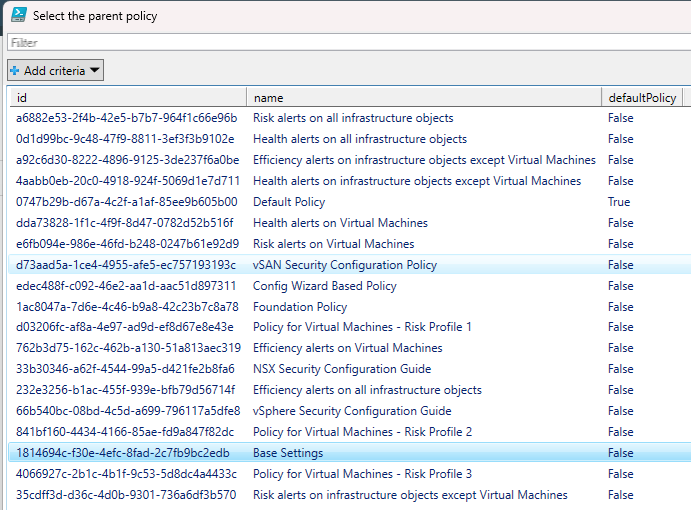
    $ParentPolicySelection = $AllPolicies.policySummaries | Out-GridView -OutputMode Single -Title "Select the parent policy"

    if ($ParentPolicySelection) {
        $ParentPolicy = $ParentPolicySelection.id
        Write-Output "Parent policy selected: $($ParentPolicySelection.name)"
    }
}

# Create Policy and Custom Group
if ($CreatePolicy) {
    Write-Output "`n--- Creating Policy and Custom Group ---"

    # Set default description if empty
    if ([string]::IsNullOrWhiteSpace($PolicyDescription)) {
        $PolicyDescription = "VCF Operations Policy"
    }

    # Validate that category and tag are provided for custom group
    if ([string]::IsNullOrWhiteSpace($CategoryName) -or [string]::IsNullOrWhiteSpace($TagName)) {
        Write-Error "Category name and Tag name are required to create a custom group"
        Write-Warning "Skipping custom group creation"
        New-VCFOpsPolicy -Name $PolicyName -Description $PolicyDescription -ParentPolicy $ParentPolicy
    }
    else {
        New-VCFOpsPolicy -Name $PolicyName -Description $PolicyDescription -ParentPolicy $ParentPolicy
        New-VCFOpsCustomGroup -Name $PolicyName -CategoryName $CategoryName -TagName $TagName
        Set-VCFOpsPolicyAssignment -PolicyName $PolicyName -CustomGroupName $PolicyName
    }
}

# Create Tag Category
$CategoryID = $null
if ($CreateCategory -or $CreateTag) {
    Write-Output "`n--- Processing Tag Category ---"

    if ($CreateCategory) {
        $CategoryResult = New-VCFOpsCategory -Name $CategoryName
    }

    # Get Category ID for tag creation
    $AllCategories = Get-VCFOpsCategory
    $Category = $AllCategories.categories | Where-Object { $_.name -eq $CategoryName }

    if ($Category) {
        $CategoryID = $Category.id
    }
    else {
        Write-Error "Category '$CategoryName' not found. Cannot create tag."
    }
}

# Create Tag
if ($CreateTag -and $CategoryID) {
    Write-Output "`n--- Creating Tag ---"
    New-VCFOpsTag -Name $TagName -CategoryID $CategoryID
}

Write-Output "`n=== VCF Operations Configuration Complete ==="
#endregion

#region Cleanup
# Release the VCF Ops API token
Invoke-RestMethod -Method POST -Uri "https://$VCFOpsFQDN/suite-api/api/auth/token/release" -Headers $script:VCFOpsSessionHeader -ContentType $script:ContentType | Out-Null
Write-Output "Session token released"
#endregion
Screenshots of the tool in action
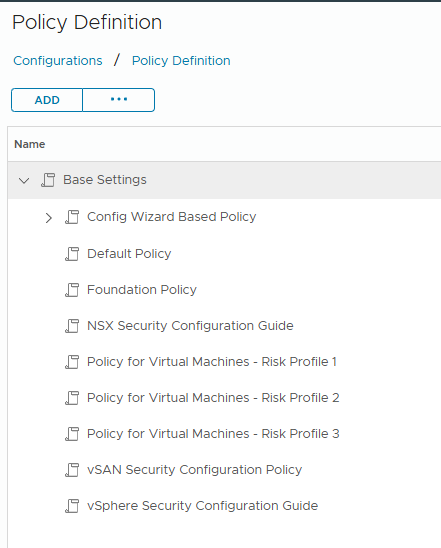
Current policy overview
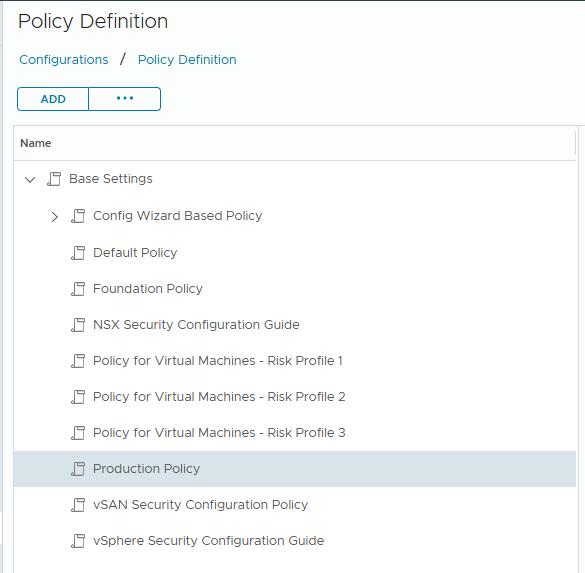
Create a new “Production Policy” policy and new tag and tag category
Optional: Select the parent policy
Validate in VCF Operations that the policy is created
Validate in VCF Operations the creation of the Custom Group
Validate the membership
Create only a new tag category

Validate in VCF Operations that the tag category is created
Create only a new tag name and attach to existing tag category
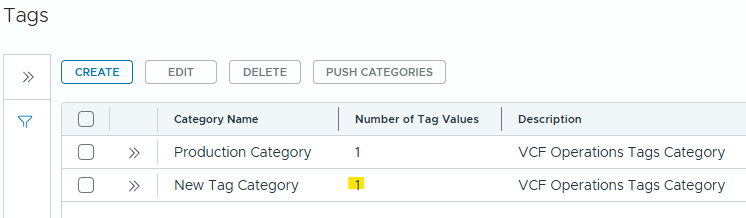
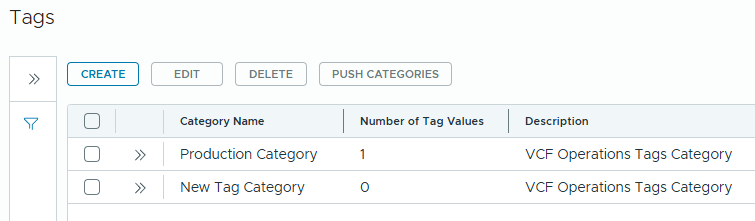
Validate in VCF Operations tag is added to the existing category